❌

Vue lecture

Il y a de nouveaux articles disponibles, cliquez pour rafraîchir la page.
🔲 ☆

Printr - Météo, sudoku et autres petits mots sur des tickets de caisse

Printr , c'est un petit projet que j'ai trouvé vraiment sympa et original qui permet de transformer une imprimante à tickets de caisse Epson TM-T88V en gadget utile pour toute la famille !!

Vous la branchez sur un Raspberry Pi, et depuis votre smartphone, vous composez un ticket au design de votre choix grâce à une quarantaine de blocs (météo, agenda, sudoku, énigmes, horoscope, photos...) disponibles. Ensuite, vous lancez l'impression, et ça sort sur le rouleau. Ou alors vous pouvez faire ça à demande, par exemple à 7 h 30 tous les matins de la semaine si vous le planifiez comme ça.

Le ticket du matin tel que le rend l'émulateur de la TM-T88V, de la météo jusqu'aux cases à cocher

Le ticket du matin, par exemple, vous donne la date et le saint du jour, la météo de votre ville (via Open-Meteo), la phase de la lune, une citation et votre liste de choses à faire dans la journée avec des cases à cocher.

Vous pouvez aussi y ajouter vos rendez-vous à partir d'un lien ICS (calendrier quoi), et même un bloc "poubelles" qui imprime "Ce soir, on sort le bac jaune" la veille du ramassage.

C'est vraiment sympa non comme façon de se faire des petits pense bêtes.

Et pour occuper les enfants (ou les grands au petit-déj), il y a également toute une série de jeux comme le sudoku, des mots mêlés en français, logimage, petit bac, calcul mental, mandala à colorier et 125 énigmes dont la réponse est imprimée à l'envers, histoire d'obliger à retourner le ticket pour la lire.

Côté horoscope, c'est Claude Haiku qui s'y colle, avec quatre tons au choix : Sérieux, farfelu, vachard ou insultant. Et le dernier ne fait pas semblant visiblement. Ce bloc et le mot du jour sont d'ailleurs les deux seuls à appeler l'API d'Anthropic (donc c'est payant) et leur texte restera en cache pour la journée. Après, si ça vous saoule de payer l'API d'Anthropic, le bloc Barnum vous calculera un horoscope gratuitement, un peu moins fun et hors ligne.

Tout ça se pilote depuis une appli web conçue pour le smartphone et chaque membre de votre famille peut avoir son compte et composer ses tickets avec un aperçu en direct, puis les enregistrer, les partager et les planifier à l'heure voulue.

L'éditeur sur ordinateur, avec à droite l'aperçu du ticket et la réponse de l'énigme imprimée à l'envers

Il y a aussi la possibilité de laisser un petit mot à distance sur l'imprimante de la maison, avec une photo prise avec le téléphone, un cœur dessiné, quelques mots...etc. Sympa quand on est loin de chez soi pour envoyer des petits mots d'amour à sa famille.

De son côté, la liste de courses est partagée entre tout le monde et se vide toute seule une fois imprimée. Et sur iOS, l'app Raccourcis peut même envoyer vos Rappels au Pi pour qu'il les imprime. Par contre, pour envoyer un mot depuis l'extérieur de chez vous, il faudra que le téléphone puisse joindre le Pi, donc soit un VPN type Tailscale, soit l'appli ouverte sur Internet derrière un reverse proxy HTTPS.

Maintenant, côté matériel, Printr, comme je vous le disais en début d'article, vise une seule imprimante bien précise, la TM-T88V, dont la largeur imprimable de 512 points est fixée en dur dans le code. Pour le reste, il vous faudra une machine Linux avec systemd, idéalement un Raspberry Pi sous Raspberry Pi OS Lite 64 bits, et l'imprimante en USB ou sur le réseau.

Et il faudra ensuite compiler tout ça, puisque le script de déploiement compile le programme pour l'architecture précise de la machine avant de l'envoyer en SSH et d'installer le service :

scripts/deploy.sh pi@printer.local

Si vous voulez voir ce que ça donne avant d'aller acheter une TM-T88V avec vos petits sousous, le dépôt fournit aussi un émulateur pour l'imprimante à lancer via la commande scripts/demo.sh qui imprimera le ticket complet dedans et en sortira une image PNG.

Merci à XNinety9 et bravo pour le boulot !!

🔲 ☆

Claude Haiku 5.5

As previously promised, here's Anthropic's new fast, low cost model: Introducing Claude Haiku 5.5.

The previous Haiku, 4.5, was very much showing its age. It came out almost a year ago, and was priced at $1/million input and $5/million output - relatively expensive even back then, and a full 10x the price of OpenAI's GPT-6 Luna, released last month.

The new Haiku exactly matches the price of GPT-6 Luna - $0.10/$0.50 - up to 100,000 tokens. Beyond 100,000 tokens the price increases 5x to $0.50/$2.50. Luna itself has a price increase at 272,000 tokens but only to $0.20/$0.75.

Haiku 5.5 also uses a new, less generous tokenizer. My Claude Token Counter tool shows that the same long prompt uses around 1.25x as many tokens with Haiku 5.5 compared to Haiku 4.5, so there's a hidden price increase there.

If your workloads fit in 100,000 tokens, Haiku is the same price as Luna and reports higher benchmark scores. Above 100,000 tokens, Luna looks like a much better deal.

The most recent release of llm-anthropic finally fixed it so I don't need to ship a new version of that plugin for every new model. I tested the new model like this:

llm install -U llm-anthropic
llm anthropic refresh
llm -m claude-haiku-5.5 "Generate an SVG of a pelican riding a bicycle" -o thinking_effort low

Pelicans

Here are pelicans for low, medium, high, xhigh, and max. The new Haiku doesn't let you disable reasoning, and defaults to medium. I got a good bicycle frame for everything beyond low. The low effort pelican cost 0.0936 cents and took 7 seconds.

This max effort pelican (with a reasoning trace that starts "This is the classic pelican-on-bicycle SVG test...") took 5 minutes 9 seconds to generate, but still only cost me 3.3826 cents:

Flat vector illustration: a white pelican wearing a red cap rides a dark grey bicycle from left to right across a green grassy strip, its long orange legs reaching down to the orange pedals, a grey wing stretched forward to grip the curved handlebars, and its large yellow-orange beak with a bulging orange throat pouch pointing ahead; behind it, white speed lines show motion, and above, a yellow sun with a pale halo and two white clouds sit in a gradient blue sky.

(Since the reasoning trace exhibits awareness of the benchmark, here's Generate an SVG of an armadillo in fishnet tights jaywalking on Mars (on xhigh), and the same prompt against some other recent models. Background on that.)

For comparison, here's the pelican I got a year ago from Haiku 4.5 (for 0.7583 cents - Haiku 4.5 did not support reasoning levels). It sucked at drawing pelicans:

Described by Haiku 4.5: A whimsical illustration of a bird with a round tan body, pink beak, and orange legs riding a bicycle against a blue sky and green grass background.

And a generous API credit scheme for subscribers

In addition to Haiku 5.5, Anthropic announced today that they are halving the price of cache reads for Sonnet 5.5. They've also added API credits to subscription plans:

Second, this week, we’ll roll out a new monthly API credit to all Max and Team subscribers for use on the Claude Platform. Max 5x users will get $100 in credits per month, Max 20x users will get $200, and Team subscribers will receive up to $500, pooled across their users.

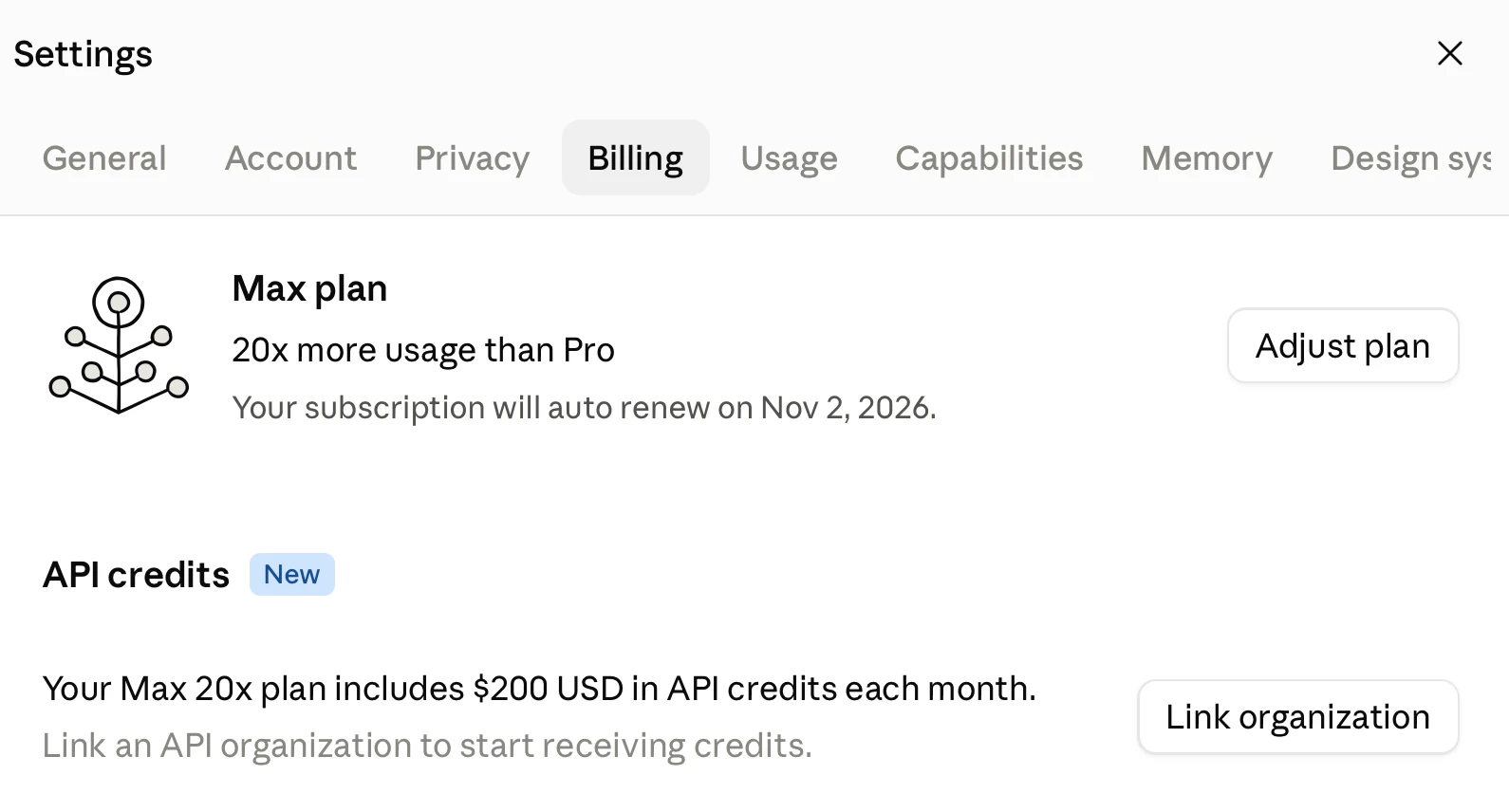
Claiming this is pleasantly easy: navigate to Settings -> Billing and select the API organization that should benefit from the credits every month:

Screenshot of a Settings dialog with a close X button at top right and a row of tabs reading "General", "Account", "Privacy", "Billing" (selected), "Usage", "Capabilities", "Memory" and "Design sys" (cut off at the edge). Beside a line-drawn icon of a branching plant with circular buds, the panel reads "Max plan", "20x more usage than Pro" and "Your subscription will auto renew on Nov 2, 2026." with an "Adjust plan" button on the right. Below is a section headed "API credits" with a blue "New" badge, reading "Your Max 20x plan includes $200 USD in API credits each month." followed by grey text "Link an API organization to start receiving credits." with a "Link organization" button on the right.

The API credits exactly match the cost of the subscription itself. This is really generous - it makes it much easier for subscribers to use the API. Anthropic also let you disable auto-reload for the API, with the consequence that "API requests will stop when your balance runs out" - exactly what you want if you're planning to burn through those API credits without risk of a nasty billing surprise.

Note that the monthly credits do not roll over - use them or lose them.

OpenAI still allow you to use your Codex subscription for personal API use, which works out as a better deal for heavy API users. This new credit scheme goes at least some way to overcoming that difference.

Tags: ai, generative-ai, llms, anthropic, claude, llm-pricing, pelican-riding-a-bicycle, llm-release

🔲 ☆

Scrimshaw Jukebox

Tool: Scrimshaw Jukebox

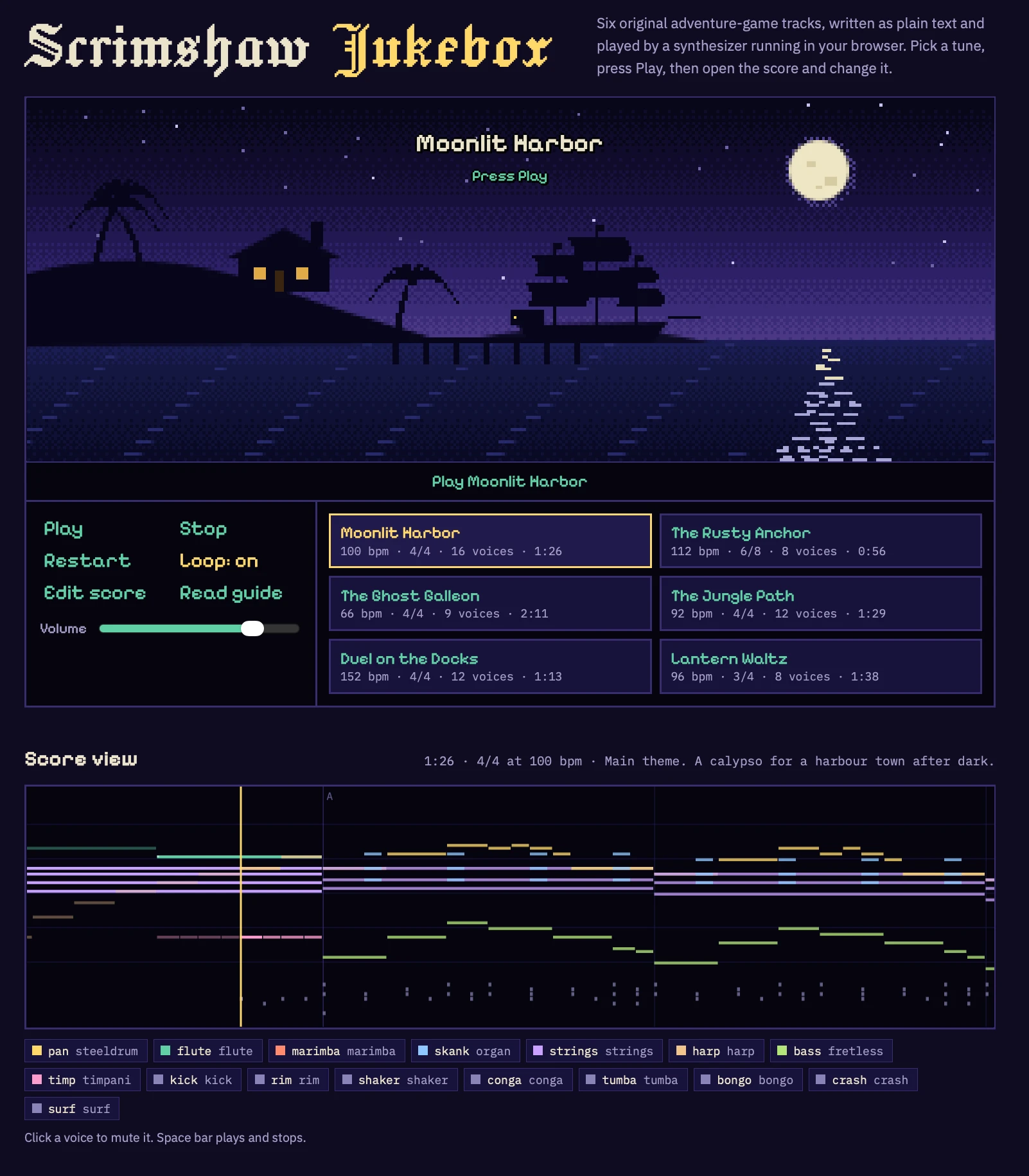
I wanted to see if Claude Opus 5.5 could compose music, so I tried this:

I want you to write some computer game music for me. First design simple text based format for the music and build an artifact that can play it out loud - include some example tracks in that artifact

I am looking for music of the quality of the original secret of Monkey Island

It leaned a lot harder into the Monkey Island theme than I had intended, but the results are surprisingly good.

Screenshot of a retro pixel-art web music player. Header in blackletter type reads "Scrimshaw Jukebox", with the text "Six original adventure-game tracks, written as plain text and played by a synthesizer running in your browser. Pick a tune, press Play, then open the score and change it." A large pixel-art scene shows a harbor at night under a purple starry sky: a full moon at top right reflecting on the water, an island silhouette on the left with palm trees and a hut with two lit windows, and a sailing ship moored at a wooden pier. Overlaid on the scene: "Moonlit Harbor" and "Press Play". Below it a bar reads "Play Moonlit Harbor". A control panel has buttons "Play", "Stop", "Restart", "Loop: on", "Edit score", "Read guide" and a "Volume" slider set to about three quarters. A track list of six cards, the first highlighted: "Moonlit Harbor 100 bpm · 4/4 · 16 voices · 1:26", "The Rusty Anchor 112 bpm · 6/8 · 8 voices · 0:56", "The Ghost Galleon 66 bpm · 4/4 · 9 voices · 2:11", "The Jungle Path 92 bpm · 4/4 · 12 voices · 1:29", "Duel on the Docks 152 bpm · 4/4 · 12 voices · 1:13", "Lantern Waltz 96 bpm · 3/4 · 8 voices · 1:38". A section titled "Score view" with the caption "1:26 · 4/4 at 100 bpm · Main theme. A calypso for a harbour town after dark." shows a piano-roll visualization of colored horizontal note bars and percussion ticks on a dark background, with a section marker "A" and a yellow vertical playhead line. A color-coded legend of voices reads: "pan steeldrum", "flute flute", "marimba marimba", "skank organ", "strings strings", "harp harp", "bass fretless", "timp timpani", "kick kick", "rim rim", "shaker shaker", "conga conga", "tumba tumba", "bongo bongo", "crash crash", "surf surf". Footer text: "Click a voice to mute it. Space bar plays and stops."

I wonder if the ability to compose competent music is similar to the 3D graphics thing - a new capability for text models that emerged in the past few months?

Would need some careful experiments with other recent and not-so-recent models to confirm if this is new or if they've been able to do this for a while.

Tags: ai, generative-ai, llms, claude, vibe-coding

🔲 ☆

Quoting Felix Rieseberg

The "old" version of Cowork runs model inference in the cloud, executing tool calls in an Anthropic-provided VM we shipped to your computer. We added the VM for capability, safety, and security reasons - mapping in just the data you explicitly added to your session. People loved what they were able to do with Claude but didn't love the disk, battery, and performance cost of running the VM locally. Also, people didn't love that closing your laptop means the work stops.

The "new" version of Cowork runs model inference and the VM in the cloud. Each session gets its own sandbox, not sharing state with other sessions. When the VM needs something on the users' device (like a file), the desktop app is responsible for that file access tool call. [...]

We think this solves a lot of problems we've heard about (like using Cowork from a phone, keeping work running, or getting all the same power without losing battery to the VM)

— Felix Rieseberg, Anthropic, see also this help page

Tags: claude-cowork, anthropic, claude, generative-ai, ai, general-agents, llms

🔲 ☆

Claude Cowork and chat are now one Claude

Claude Cowork and chat are now one Claude

In hopefully good news for anyone who, like me, was increasingly confused at Cowork v.s. Claude v.s. Claude Code:

Starting today, Claude Cowork and chat are merging into one Claude. Bring a quick question, or hand over a report due at noon, and Claude takes it from there, even after you’ve closed your laptop. [...]

This is rolling out to Pro and Max plans first, in the Claude app on web, desktop, and mobile over the coming weeks to existing and new users on these plans.

I guess this means Claude is becoming a general agent in its own right. Echoes of OpenAI renaming their Codex desktop app to ChatGPT a few weeks ago.

On the one hand, this saves me some work, in that I was planning to finally figure out the boundaries between Cowork and regular Claude and write a follow-up to my piece on Understanding ChatGPT Work.

I have a hunch that figuring out what this actually means in terms of features and surfaces is still going to take quite a bit of work.

Via Hacker News

Tags: ai, generative-ai, llms, anthropic, claude, general-agents

🔲 ☆

Quoting Boris Cherny

Production code written by Claude should have a higher bar than if it was written by a human. At Anthropic, we have many guardrails in place to make sure this is happening: lots of lint rules, lots of tests, Claude-driven end to end tests, Claude-powered fuzzers running daily, automated code reviews and security reviews, automated code refactoring, and so on. Without these, you can end up with a mess that is hard to maintain down the line.

— Boris Cherny

Tags: claude, ai, claude-code, llms, coding-agents, ai-assisted-programming, generative-ai, agentic-engineering, boris-cherny, anthropic

🔲 ☆

Dark mode

I've never been particularly invested dark v.s. light mode but I get enough people complaining that this site is "blinding" that I decided to see if Claude Code for web could produce a useful dark mode from my existing CSS. It did a decent job, using CSS properties, @media (prefers-color-scheme: dark) and a data-theme="dark" attribute based on this prompt:

Add a dark theme which is triggered by user media preferences but can also be switched on using localStorage - then put a little icon in the footer for toggling it between default auto, forced regular and forced dark mode

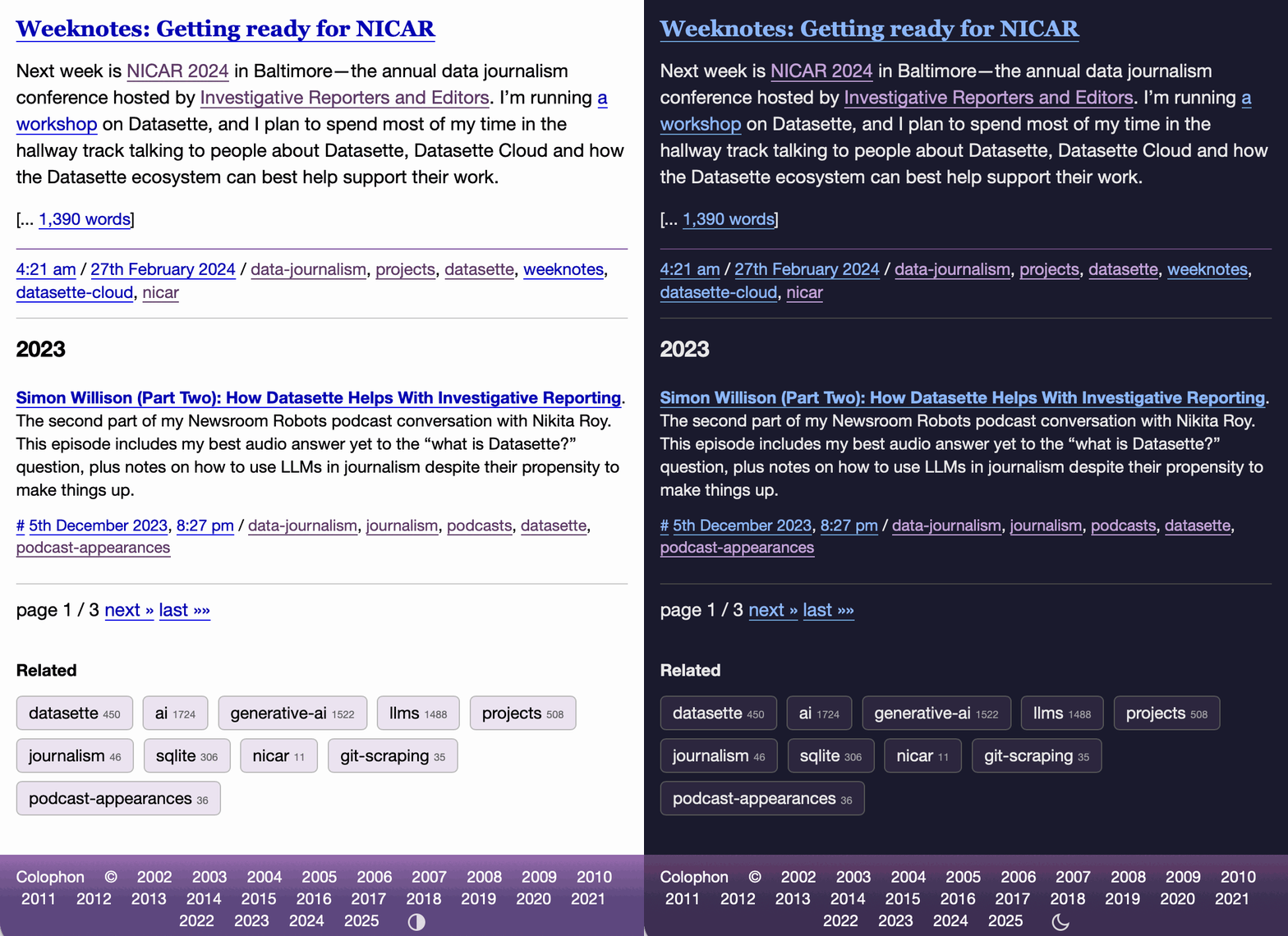
The site defaults to picking up the user's preferences, but there's also a toggle in the footer which switches between auto, forced-light and forced-dark. Here's an animated demo:

This site on mobile. Clicking the icon in the footer switches to a black background with readable text.

I had Claude Code make me that GIF from two static screenshots - it used this ImageMagick recipe:

magick -delay 300 -loop 0 one.png two.png \
    -colors 128 -layers Optimize dark-mode.gif

The CSS ended up with some duplication due to the need to handle both the media preference and the explicit user selection. We fixed that with Cog.

Tags: css, coding-agents, ai-assisted-programming, claude, claude-code, design, llms, ai, generative-ai

🔲 ☆

AiFormat – Un outil en ligne de commande pour formater vos fichiers pour Claude

Si vous vous intéressez un peu aux outils IA, vous connaissez sûrement Claude, l’assistant IA dernière génération d’Anthropic. Depuis la sortie de sa version 3, c’est d’ailleurs devenu mon meilleur pote pour coder à la vitesse de l’éclair. j’ai même pris un abonnement payant en rusant un peu.

Toutefois, le seul truc qui me ralentissait dans mes grandes ambitions, c’était de devoir copier-coller à la main tous mes fichiers de code dans la fenêtre de contexte de Claude pour ensuite lui demander d’analyser ça, et me proposer des corrections ou une nouvelle fonction. Mais ça, c’était avant car je suis tombé sur un petit bijou opensource qui va vous changer la vie : AiFormat.

Ce petit outil en ligne de commande vous permet de sélectionner des fichiers et dossiers, et de les convertir automatiquement dans un format optimisé pour Claude. En deux clics, tout est dans le presse-papier, prêt à être envoyé à votre IA préférée.

Sous le capot, AiFormat utilise Ink, une chouette librairie pour créer des CLI avec une belle interface utilisateur. Ça vous permet de filtrer et naviguer dans vos fichiers, de les sélectionner avec les flèches, et tout ça de façon super intuitive.

Pour l’installer et le prendre en main, c’est hyper simple, tout est expliqué sur la page Github du projet. Ça commence par un simple :

npm install --global aiformat

Ensuite, pour utiliser aiformat, accédez au répertoire contenant les fichiers et dossiers que vous souhaitez partager avec Claude puis lancez la commande suivante :

aiformat

Le créateur a eu la bonne idée de mettre le projet en opensource (MIT license), du coup n’hésitez pas à y jeter un œil et même contribuer si le cœur vous en dit. La communauté vous dira merci !

Franchement, si vous utilisez souvent Claude pour coder ou analyser des projets, c’est un indispensable à avoir dans sa boîte à outils. Ça vous fera gagner un temps fou au quotidien.

❌