❌

Vue lecture

Il y a de nouveaux articles disponibles, cliquez pour rafraîchir la page.
🔲 ☆

Claude Haiku 5.5

As previously promised, here's Anthropic's new fast, low cost model: Introducing Claude Haiku 5.5.

The previous Haiku, 4.5, was very much showing its age. It came out almost a year ago, and was priced at $1/million input and $5/million output - relatively expensive even back then, and a full 10x the price of OpenAI's GPT-6 Luna, released last month.

The new Haiku exactly matches the price of GPT-6 Luna - $0.10/$0.50 - up to 100,000 tokens. Beyond 100,000 tokens the price increases 5x to $0.50/$2.50. Luna itself has a price increase at 272,000 tokens but only to $0.20/$0.75.

Haiku 5.5 also uses a new, less generous tokenizer. My Claude Token Counter tool shows that the same long prompt uses around 1.25x as many tokens with Haiku 5.5 compared to Haiku 4.5, so there's a hidden price increase there.

If your workloads fit in 100,000 tokens, Haiku is the same price as Luna and reports higher benchmark scores. Above 100,000 tokens, Luna looks like a much better deal.

The most recent release of llm-anthropic finally fixed it so I don't need to ship a new version of that plugin for every new model. I tested the new model like this:

llm install -U llm-anthropic
llm anthropic refresh
llm -m claude-haiku-5.5 "Generate an SVG of a pelican riding a bicycle" -o thinking_effort low

Pelicans

Here are pelicans for low, medium, high, xhigh, and max. The new Haiku doesn't let you disable reasoning, and defaults to medium. I got a good bicycle frame for everything beyond low. The low effort pelican cost 0.0936 cents and took 7 seconds.

This max effort pelican (with a reasoning trace that starts "This is the classic pelican-on-bicycle SVG test...") took 5 minutes 9 seconds to generate, but still only cost me 3.3826 cents:

Flat vector illustration: a white pelican wearing a red cap rides a dark grey bicycle from left to right across a green grassy strip, its long orange legs reaching down to the orange pedals, a grey wing stretched forward to grip the curved handlebars, and its large yellow-orange beak with a bulging orange throat pouch pointing ahead; behind it, white speed lines show motion, and above, a yellow sun with a pale halo and two white clouds sit in a gradient blue sky.

(Since the reasoning trace exhibits awareness of the benchmark, here's Generate an SVG of an armadillo in fishnet tights jaywalking on Mars (on xhigh), and the same prompt against some other recent models. Background on that.)

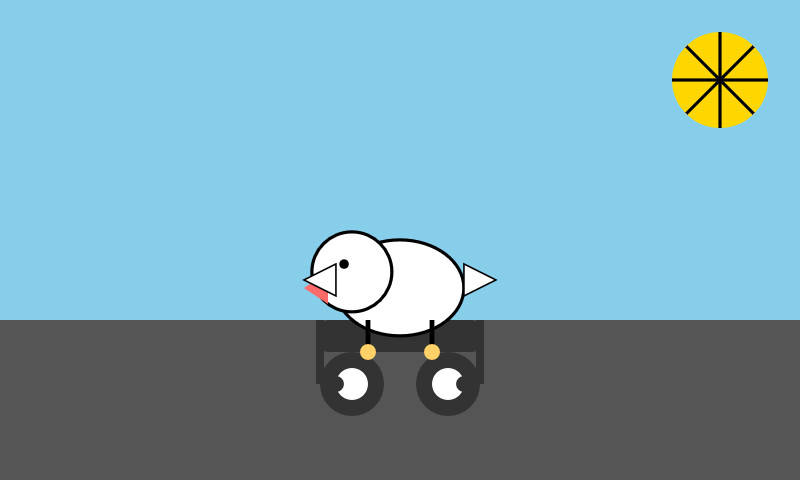
For comparison, here's the pelican I got a year ago from Haiku 4.5 (for 0.7583 cents - Haiku 4.5 did not support reasoning levels). It sucked at drawing pelicans:

Described by Haiku 4.5: A whimsical illustration of a bird with a round tan body, pink beak, and orange legs riding a bicycle against a blue sky and green grass background.

And a generous API credit scheme for subscribers

In addition to Haiku 5.5, Anthropic announced today that they are halving the price of cache reads for Sonnet 5.5. They've also added API credits to subscription plans:

Second, this week, we’ll roll out a new monthly API credit to all Max and Team subscribers for use on the Claude Platform. Max 5x users will get $100 in credits per month, Max 20x users will get $200, and Team subscribers will receive up to $500, pooled across their users.

Claiming this is pleasantly easy: navigate to Settings -> Billing and select the API organization that should benefit from the credits every month:
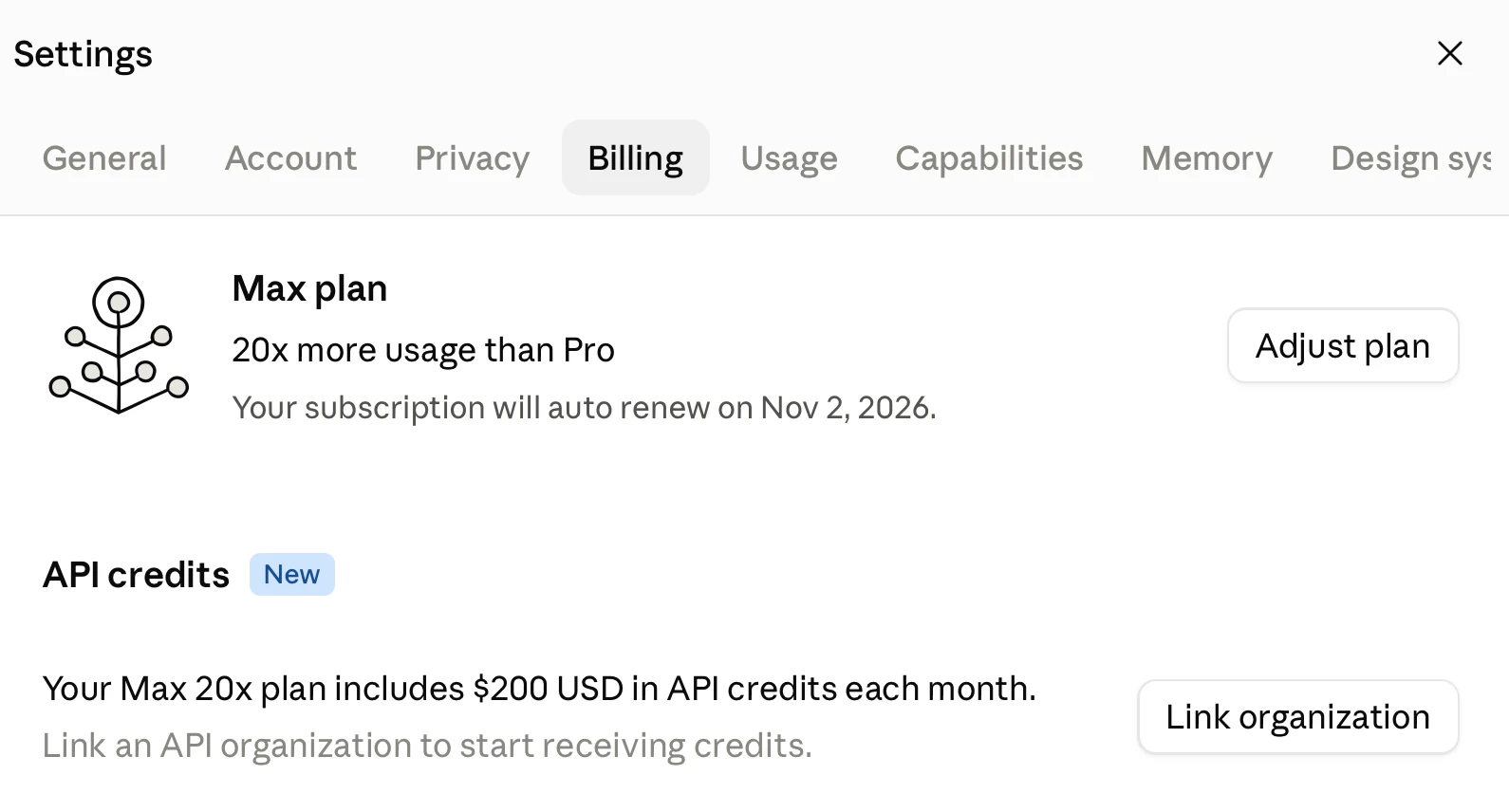
Screenshot of a Settings dialog with a close X button at top right and a row of tabs reading "General", "Account", "Privacy", "Billing" (selected), "Usage", "Capabilities", "Memory" and "Design sys" (cut off at the edge). Beside a line-drawn icon of a branching plant with circular buds, the panel reads "Max plan", "20x more usage than Pro" and "Your subscription will auto renew on Nov 2, 2026." with an "Adjust plan" button on the right. Below is a section headed "API credits" with a blue "New" badge, reading "Your Max 20x plan includes $200 USD in API credits each month." followed by grey text "Link an API organization to start receiving credits." with a "Link organization" button on the right.

The API credits exactly match the cost of the subscription itself. This is really generous - it makes it much easier for subscribers to use the API. Anthropic also let you disable auto-reload for the API, with the consequence that "API requests will stop when your balance runs out" - exactly what you want if you're planning to burn through those API credits without risk of a nasty billing surprise.

Note that the monthly credits do not roll over - use them or lose them.

OpenAI still allow you to use your Codex subscription for personal API use, which works out as a better deal for heavy API users. This new credit scheme goes at least some way to overcoming that difference.

Tags: ai, generative-ai, llms, anthropic, claude, llm-pricing, pelican-riding-a-bicycle, llm-release

🔲 ☆

Introducing Mistral Large 4: Le chonk

Introducing Mistral Large 4: Le chonk

Mistral are back in the game. Today they're releasing a preview of Mistral Large 4, a 1 trillion parameter, 49 billion active parameter model trained on their own cluster of 3,800 NVIDIA Grace Blackwell GPUs.

The preview is available via their API. They promise to release the open weights model at the "end of this month".

The model only supports two reasoning levels - "none" and "high" - via the Mistral API. Here are both pelicans - the "high" one looks better, though surprisingly it only used 2,717 output tokens compared to "none" which used 3,275:

It's good. The pouch is great, the bicycle frame is the right size, it has feet on pedals. Both pedals appear in front of the frame though. Nice gradients.

On Artificial Analysis it scores 38, just behind DeepSeek 4.1 Flash, which is a 552B model. It's a huge improvement on last December's Mistral Large 3, which drew this terrible pelican and scored 9 on AA.

It's certainly not a Fable-class model, but it's great to see Mistral put out a model that's back to being maybe about 6 months behind the frontier.

Via Hacker News

Tags: ai, generative-ai, llms, mistral, pelican-riding-a-bicycle, llm-release

🔲 ☆

Gemini Live audio

Tool: Gemini Live audio

Google released Gemini 3.8 Live and 3.8 Live Extended Thinking today - two new speech-to-speech models that are a similar shape to OpenAI's GPT-Live family.

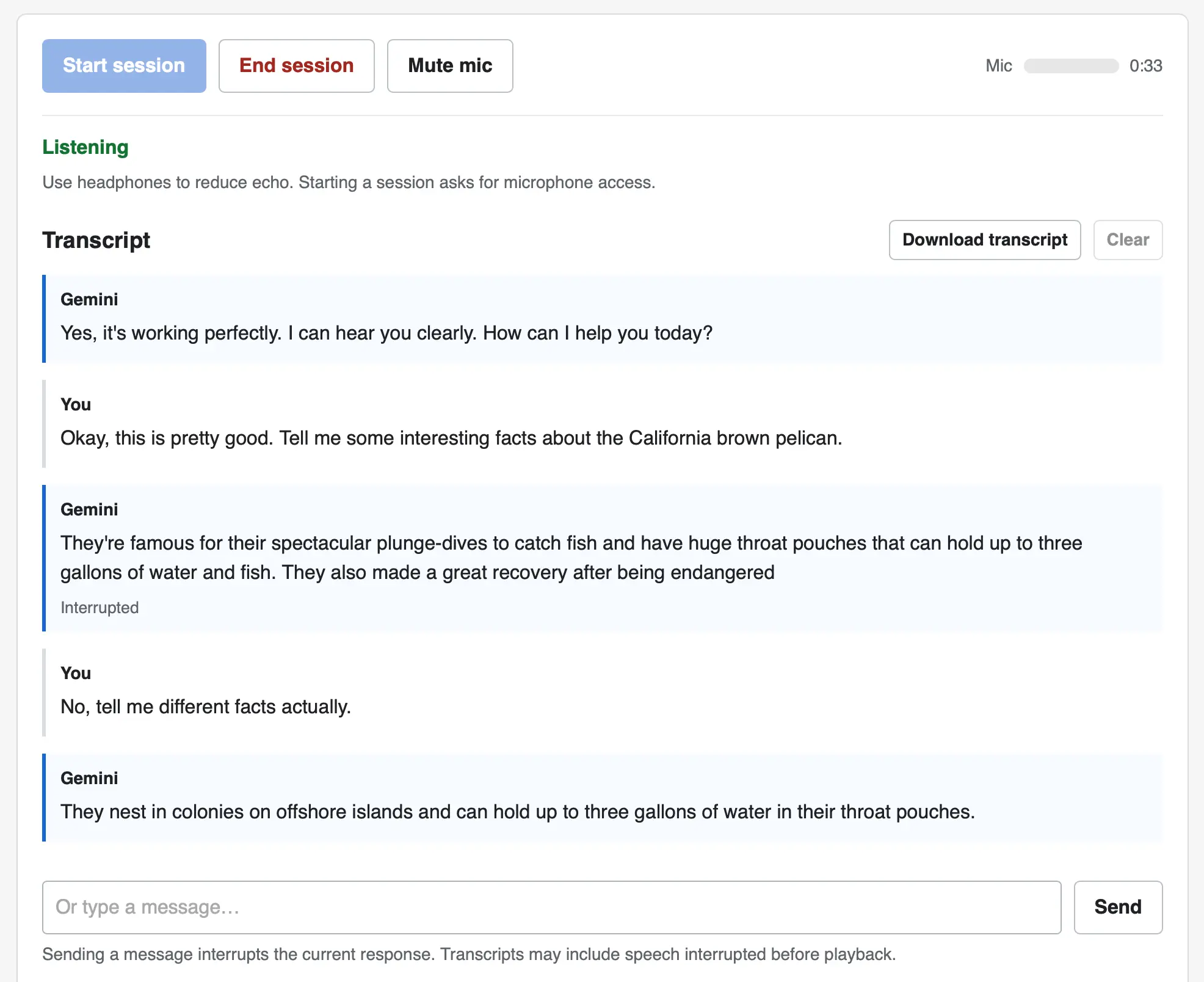
I pointed GPT-6 Astra Extra High at the documentation and had it build me this web UI for trying out the new models. You can select a model and voice preset, enter an optional system prompt and then start a voice conversation through your browser, including the ability to interrupt the model while it is talking.

Screenshot of a voice chat web interface with a transcript. Top buttons: Start session, End session, Mute mic, plus a Mic level meter and a timer showing 0:33. Status: Listening. Use headphones to reduce echo. Starting a session asks for microphone access. Transcript (with Download transcript and Clear buttons). Gemini: Yes, it's working perfectly. I can hear you clearly. How can I help you today? You: Okay, this is pretty good. Tell me some interesting facts about the California brown pelican. Gemini: They're famous for their spectacular plunge-dives to catch fish and have huge throat pouches that can hold up to three gallons of water and fish. They also made a great recovery after being endangered — marked as Interrupted. You: No, tell me different facts actually. Gemini: They nest in colonies on offshore islands and can hold up to three gallons of water in their throat pouches. At the bottom is a text input reading Or type a message… with a Send button, and the note: Sending a message interrupts the current response. Transcripts may include speech interrupted before playback.

The implementation uses no libraries. It connects to the wss://generativelanguage.googleapis.com/ws/google.ai.generativelanguage.v1alpha.GenerativeService.BidiGenerateContent?key=... WebSocket endpoint and uses a Web Audio API AudioContext for both capture and playback.

Here's the Gemini Live tutorial for getting started with that WebSockets API.

Tags: google, tools, websockets, generative-ai, llms, gemini, llm-release, speech-to-text

🔲 ☆

Gemini 3 Flash

It continues to be a busy December, if not quite as busy as last year. Today's big news is Gemini 3 Flash, the latest in Google's "Flash" line of faster and less expensive models.

Google are emphasizing the comparison between the new Flash and their previous generation's top model Gemini 2.5 Pro:

Building on 3 Pro’s strong multimodal, coding and agentic features, 3 Flash offers powerful performance at less than a quarter the cost of 3 Pro, along with higher rate limits. The new 3 Flash model surpasses 2.5 Pro across many benchmarks while delivering faster speeds.

Gemini 3 Flash's characteristics are almost identical to Gemini 3 Pro: it accepts text, image, video, audio, and PDF, outputs only text, handles 1,048,576 maximum input tokens and up to 65,536 output tokens, and has the same knowledge cut-off date of January 2025 (also shared with the Gemini 2.5 series).

The benchmarks look good. The cost is appealing: 1/4 the price of Gemini 3 Pro ≤200k and 1/8 the price of Gemini 3 Pro >200k, and it's nice not to have a price increase for the new Flash at larger token lengths.

It's a little more expensive than previous Flash models - Gemini 2.5 Flash was $0.30/million input tokens and $2.50/million on output, Gemini 3 Flash is $0.50/million and $3/million respectively.

Google claim it may still end up cheaper though, due to more efficient output token usage:

> Gemini 3 Flash is able to modulate how much it thinks. It may think longer for more complex use cases, but it also uses 30% fewer tokens on average than 2.5 Pro.

Here's a more extensive price comparison on my llm-prices.com site.

Generating some SVGs of pelicans

I released llm-gemini 0.28 this morning with support for the new model. You can try it out like this:

llm install -U llm-gemini
llm keys set gemini # paste in key
llm -m gemini-3-flash-preview "Generate an SVG of a pelican riding a bicycle"

According to the developer docs the new model supports four different thinking level options: minimal, low, medium, and high. This is different from Gemini 3 Pro, which only supported low and high.

You can run those like this:

llm -m gemini-3-flash-preview --thinking-level minimal "Generate an SVG of a pelican riding a bicycle"

Here are four pelicans, for thinking levels minimal, low, medium, and high:

A minimalist vector illustration of a stylized white bird with a long orange beak and a red cap riding a dark blue bicycle on a single grey ground line against a plain white background. Minimalist illustration: A stylized white bird with a large, wedge-shaped orange beak and a single black dot for an eye rides a red bicycle with black wheels and a yellow pedal against a solid light blue background. A minimalist illustration of a stylized white bird with a large yellow beak riding a red road bicycle in a racing position on a light blue background. Minimalist line-art illustration of a stylized white bird with a large orange beak riding a simple black bicycle with one orange pedal, centered against a light blue circular background.

I built the gallery component with Gemini 3 Flash

The gallery above uses a new Web Component which I built using Gemini 3 Flash to try out its coding abilities. The code on the page looks like this:

<image-gallery width="4">
    <img src="https://static.simonwillison.net/static/2025/gemini-3-flash-preview-thinking-level-minimal-pelican-svg.jpg" alt="A minimalist vector illustration of a stylized white bird with a long orange beak and a red cap riding a dark blue bicycle on a single grey ground line against a plain white background." />
    <img src="https://static.simonwillison.net/static/2025/gemini-3-flash-preview-thinking-level-low-pelican-svg.jpg" alt="Minimalist illustration: A stylized white bird with a large, wedge-shaped orange beak and a single black dot for an eye rides a red bicycle with black wheels and a yellow pedal against a solid light blue background." />
    <img src="https://static.simonwillison.net/static/2025/gemini-3-flash-preview-thinking-level-medium-pelican-svg.jpg" alt="A minimalist illustration of a stylized white bird with a large yellow beak riding a red road bicycle in a racing position on a light blue background." />
    <img src="https://static.simonwillison.net/static/2025/gemini-3-flash-preview-thinking-level-high-pelican-svg.jpg" alt="Minimalist line-art illustration of a stylized white bird with a large orange beak riding a simple black bicycle with one orange pedal, centered against a light blue circular background." />
</image-gallery>

Those alt attributes are all generated by Gemini 3 Flash as well, using this recipe:

llm -m gemini-3-flash-preview --system '
You write alt text for any image pasted in by the user. Alt text is always presented in a
fenced code block to make it easy to copy and paste out. It is always presented on a single
line so it can be used easily in Markdown images. All text on the image (for screenshots etc)
must be exactly included. A short note describing the nature of the image itself should go first.' \
-a https://static.simonwillison.net/static/2025/gemini-3-flash-preview-thinking-level-high-pelican-svg.jpg

You can see the code that powers the image gallery Web Component here on GitHub. I built it by prompting Gemini 3 Flash via LLM like this:

llm -m gemini-3-flash-preview '
Build a Web Component that implements a simple image gallery. Usage is like this:

<image-gallery width="5">
  <img src="image1.jpg" alt="Image 1">
  <img src="image2.jpg" alt="Image 2" data-thumb="image2-thumb.jpg">
  <img src="image3.jpg" alt="Image 3">
</image-gallery>

If an image has a data-thumb= attribute that one is used instead, other images are scaled down. 

The image gallery always takes up 100% of available width. The width="5" attribute means that five images will be shown next to each other in each row. The default is 3. There are gaps between the images. When an image is clicked it opens a modal dialog with the full size image.

Return a complete HTML file with both the implementation of the Web Component several example uses of it. Use https://picsum.photos/300/200 URLs for those example images.'

It took a few follow-up prompts using llm -c:

llm -c 'Use a real modal such that keyboard shortcuts and accessibility features work without extra JS'

llm -c 'Use X for the close icon and make it a bit more subtle'

llm -c 'remove the hover effect entirely'

llm -c 'I want no border on the close icon even when it is focused'

Here's the full transcript, exported using llm logs -cue.

Those five prompts took:

  • 225 input, 3,269 output
  • 2,243 input, 2,908 output
  • 4,319 input, 2,516 output
  • 6,376 input, 2,094 output
  • 8,151 input, 1,806 output

Added together that's 21,314 input and 12,593 output for a grand total of 4.8436 cents.

The guide to migrating from Gemini 2.5 reveals one disappointment:

Image segmentation: Image segmentation capabilities (returning pixel-level masks for objects) are not supported in Gemini 3 Pro or Gemini 3 Flash. For workloads requiring native image segmentation, we recommend continuing to utilize Gemini 2.5 Flash with thinking turned off or Gemini Robotics-ER 1.5.

I wrote about this capability in Gemini 2.5 back in April. I hope they come back in future models - they're a really neat capability that is unique to Gemini.

Tags: google, ai, web-components, generative-ai, llms, llm, gemini, llm-pricing, pelican-riding-a-bicycle, llm-release

🔲 ☆

Devstral 2

Devstral 2

Two new models from Mistral today: Devstral 2 and Devstral Small 2 - both focused on powering coding agents such as Mistral's newly released Mistral Vibe which I wrote about earlier today.
  • Devstral 2: SOTA open model for code agents with a fraction of the parameters of its competitors and achieving 72.2% on SWE-bench Verified.
  • Up to 7x more cost-efficient than Claude Sonnet at real-world tasks.

Devstral 2 is a 123B model released under a janky license - it's "modified MIT" where the modification is:

You are not authorized to exercise any rights under this license if the global consolidated monthly revenue of your company (or that of your employer) exceeds $20 million (or its equivalent in another currency) for the preceding month. This restriction in (b) applies to the Model and any derivatives, modifications, or combined works based on it, whether provided by Mistral AI or by a third party. [...]

Mistral Small 2 is under a proper Apache 2 license with no weird strings attached. It's a 24B model which is 51.6GB on Hugging Face and should quantize to significantly less.

I tried out the larger model via my llm-mistral plugin like this:

llm install llm-mistral
llm mistral refresh
llm -m mistral/devstral-2512 "Generate an SVG of a pelican riding a bicycle"

Bicycle looks a bit like a cybertruck

For a ~120B model that one is pretty good!

Here's the same prompt with -m mistral/labs-devstral-small-2512 for the API hosted version of Devstral Small 2:

A small white pelican on what looks more like a child's cart.

Again, a decent result given the small parameter size. For comparison, here's what I got for the 24B Mistral Small 3.2 earlier this year.

Tags: ai, generative-ai, llms, llm, mistral, pelican-riding-a-bicycle, llm-release, janky-licenses

❌